
Apple to HDMI Adapter
$5.00
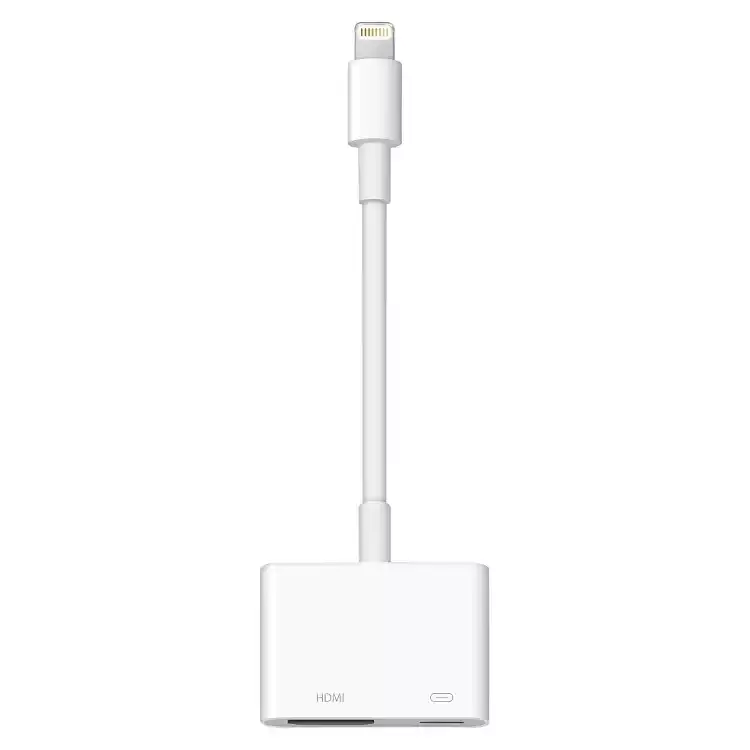
Apple to HDMI Adapter supporting full 1080P HD screen mirroring for iPhone, iPad, and iPod. Plug-and-play configuration requires no external power or software setup.
Apple to HDMI Adapter
Ensuring seamless audio and video connectivity is one of the most critical components of running a successful presentation, wedding slideshow, or corporate seminar. Our premium Apple to HDMI Adapter provides a reliable, plug-and-play solution for broadcasting high-definition content directly from your iOS devices to external displays. Whether you need to link an iPhone, iPad, or iPod to a high-definition projector, a large-format LED monitor, or a comprehensive venue sound system, this digital AV hardware line ensures your media delivers perfectly every time.
Operating at a crisp, full 1080P digital high-definition resolution, this Apple to HDMI Adapter synchronizes both audio and video signals simultaneously without any lag, stuttering, or distortion. It eliminates the technical headaches often associated with mobile device mirroring, allowing presenters, event hosts, and coordinators across Northern Colorado to focus on their audience rather than troubleshooting complex cable arrays.
High-Definition Performance & Event Versatility
This rugged audio-visual adapter is engineered specifically to handle the demands of live staging and frequent venue setups. Unlike cheaper consumer alternatives that require constant external power inputs or buggy third-party software applications to mirror your screen, our professional-grade Apple to HDMI Adapter features a direct sync connector setup. Simply plug the lightning terminal into your mobile device and connect a standard high-speed HDMI line into the receiving monitor or projector matrix.
The heavy-gauge internal wiring and shielded terminal connectors protect against ambient signal interference, which is common in busy exhibition halls, hotels, and crowded conference spaces. Using a dedicated Apple to HDMI Adapter guarantees that your high-resolution video streams, presentations, and audio tracks maintain pristine data integrity over long cable runs.
Key Features & Technical Specifications:
-
Universal iOS Compatibility: This Apple to HDMI Adapter works seamlessly with lightning-equipped iPhone, iPad, and iPod models.
-
Full 1080P HD Output: Delivers crystal-clear digital video mirroring and synchronized audio to any compatible monitor or television screen.
-
True Plug-and-Play Setup: Completely driverless configuration requires no software downloads, network connections, or complex power supply routing.
-
Heavy-Duty Build Quality: Reinforced strain-relief collars prevent cable degradation from frequent wrapping, transport, and venue deployment.
Recommended Event Setups & Staging:
-
Corporate Presentations: Connect your iPad directly to presentation display boards or overhead projection screens for flawless business pitches.
-
Wedding Slideshows & Videos: Easily mirror custom wedding timelines or family photo galleries from an iPhone straight to the main banquet hall display using a reliable Apple to HDMI Adapter.
-
Community Festivals & Gatherings: Stream high-quality backing tracks or promotional visuals to your staging setups with absolute confidence.
Product Operation & Setup Details
Planning your presentation timeline and want to ensure a flawless connection from your mobile device to the venue screen? Following the official documentation provided in the Apple Support Guide, setting up your high-definition display link is a simple, straightforward process:
-
Connect the Adapter to Your Device: Plug the male Lightning terminal of the hardware adapter directly into the charging port located on the bottom of your iPhone or iPad.
-
Link the Display Line: Insert a standard male-to-male high-speed HDMI cable into the open female socket on the adapter housing.
-
Bridge to the Receiving Monitor: Connect the remaining end of that HDMI line straight into the input terminal port on your display monitor, projector matrix, or television screen.
-
Select the Media Input Source: Power on your external display equipment and use its control panel or remote to cycle the video source channel to match the specific slot where your hardware cable is attached (e.g., HDMI 1 or HDMI 2).Pro Staging Tip: This professional digital hardware adapter features an integrated auxiliary pass-through port right next to the video line terminal. This allows you to simultaneously plug in a standard charging cable during your live event, keeping your mobile device fully powered up during lengthy slide presentation loops, wedding videos, or corporate displays.
Product Operation & Venue Logistics
Looking to integrate mobile devices into an expanded sound matrix? Don't forget to pair this connector line with our high-performance Bluetooth Sound System- Liberty or elevate your auxiliary output using a steady Speaker Tripod Stand Liberty. Reviewing your technical display settings prior to your event ensures your media aspect ratios are perfectly optimized for the venue layout.
All of our high-grade adapters, utility extensions, and signal distribution assets are available on a convenient daily rate basis. You can pick up your reserved equipment bundles directly from our local warehouse or coordinate a comprehensive delivery package to your location in Fort Collins, Loveland, Windsor, or the surrounding areas. To lock in this essential adapter link for your specific event dates, add it to your online cart and submit a temporary quote request.